
Table of Contents
- What Are Brochure Folds?
- Compare Seven Brochure Folds
- Choose a Fold for Your Marketing Message
- Set Up Panels, Bleed and Reading Order
- Choose Paper and Plan Brochure Scoring
- Match the Format to the Printed Product
- Check a Folded Sample Before Production
- Key Takeaways for Your Brochure Order
The right brochure fold guides readers through your message and affects panel dimensions, paper choice and production. Compare seven formats and learn what to confirm before approving artwork.
What Are Brochure Folds?
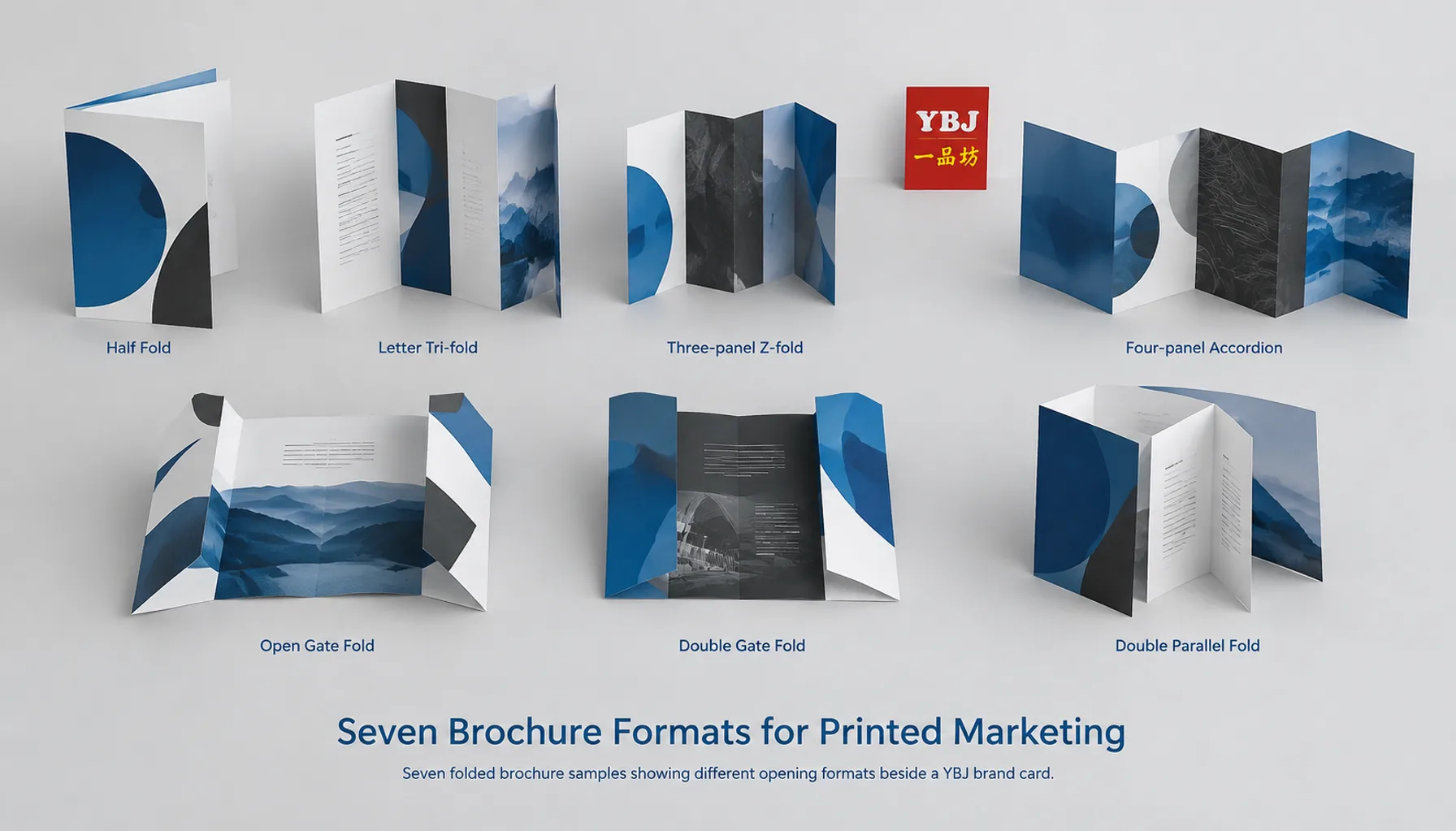
Brochure folds divide a printed sheet into connected panels that control how readers open and explore your marketing message. Seven useful options are half fold, tri-fold, Z-fold, accordion fold, gate fold, double gate fold and double parallel fold. Choose according to reading sequence, content volume, finished size and paper behavior.
A half fold suits a simple introduction; a tri-fold organizes compact service information; an accordion supports a continuous sequence; and a gate fold creates a central reveal. The right choice makes the next piece of information easy to find.
Definition: Flat size is the sheet size before folding. Finished size is the closed brochure size. A panel is an area between folds or edges; each panel has two printable faces. Here, panel counts include both sides, so a three-panel sheet provides six printable panel faces.
These examples assume a single sheet printed on both sides. Final dimensions, fold allowances, stock and finishing must be agreed with the printer before artwork approval.
Compare Seven Brochure Folds
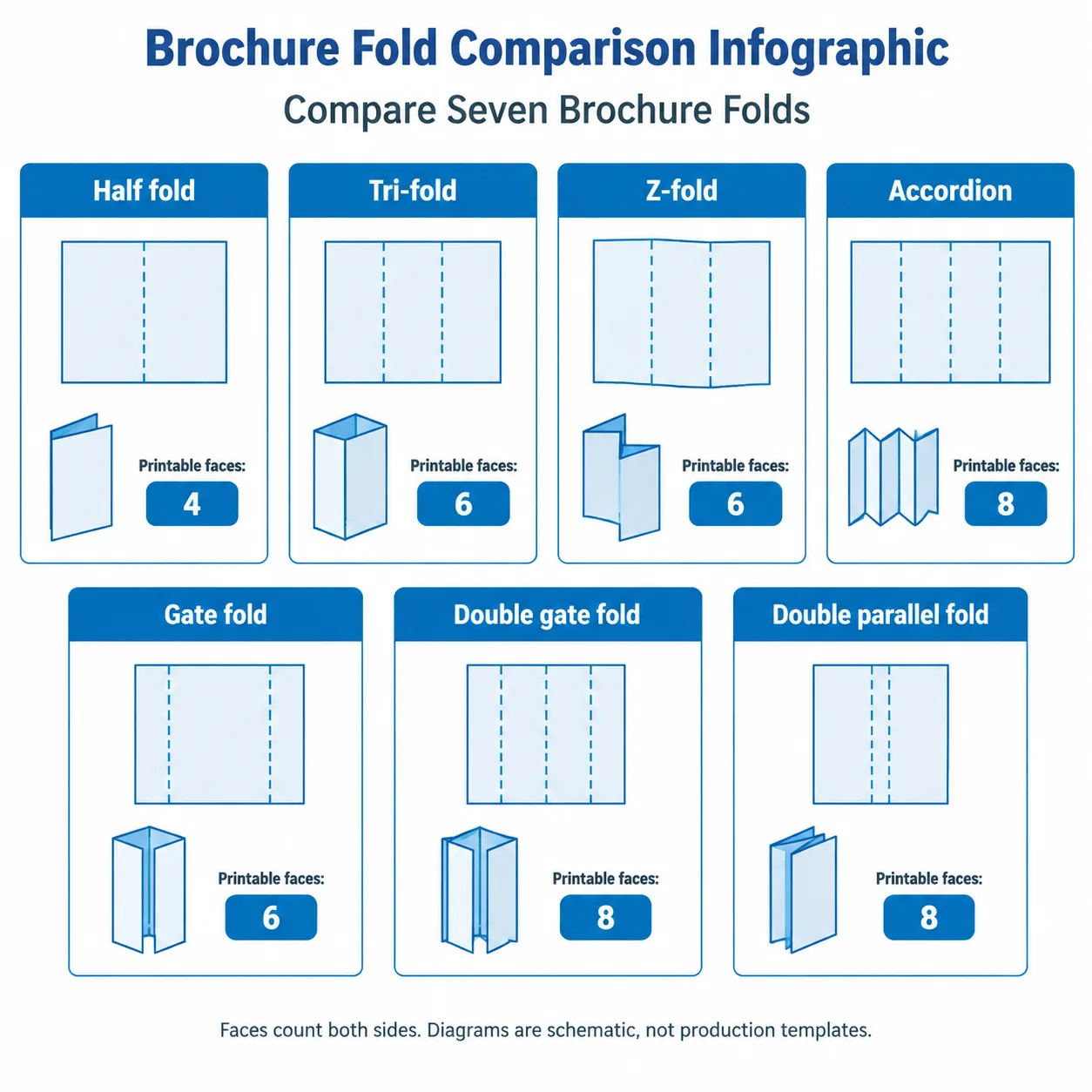
The main difference between folds is how they expose information. Start with the reader’s task, then check whether the format provides enough usable space.
| Fold | Printable faces | Opening behavior | Useful marketing application | Main artwork check |
|---|---|---|---|---|
| Half fold | 4 | Opens once like a book | Company introduction or short offer | Cover orientation and center fold |
| Tri-fold / letter fold | 6 | One panel tucks inside another | Services, promotions and handouts | Narrower tuck-in panel |
| Z-fold | 6 | Alternating folds open in a zigzag | Three-stage explanation or comparison | Sequence across both sides |
| Accordion fold, four-panel example | 8 | Alternating folds extend into a strip | Timelines, ranges and process guides | Continuous layout and reverse-side order |
| Gate fold | 6 | Two flaps open onto a wide center | Product or campaign reveal | Flap clearance and meeting edges |
| Double gate fold | 8 | Gate-folded sheet closes again at the center | Layered campaign presentation | Nested thickness and fold sequence |
| Double parallel fold | 8 | Sheet folds in half, then in half again | Compact information-rich handout | Nested panel allowances |
Z-fold is a three-panel member of the accordion family. It is listed separately here because buyers commonly distinguish it from longer accordion formats.
Choose a Fold for Your Marketing Message
Choose the fold that supports your message’s natural order. Sketch what the reader sees when the brochure is closed, partly open and fully open before assigning text to panels.
For a campaign with one clear offer, fewer panels can improve focus. For a range of products or a process explanation, additional panels help only when each has a distinct purpose.
1. Half Fold: A Clear, Spacious Introduction
A half fold creates two panels and four printable faces with one fold. Readers open it like a short booklet, making the sequence easy to understand.
Use the front for the offer, the inside spread for supporting information and the back for contact details. This format suits company profiles, event programs and short product presentations. Its broad panels accommodate larger photographs and readable copy.
The tradeoff is limited segmentation. If the layout becomes crowded, reduce the content or consider a booklet instead of shrinking the text.
2. Tri-Fold: A Compact Service or Sales Handout
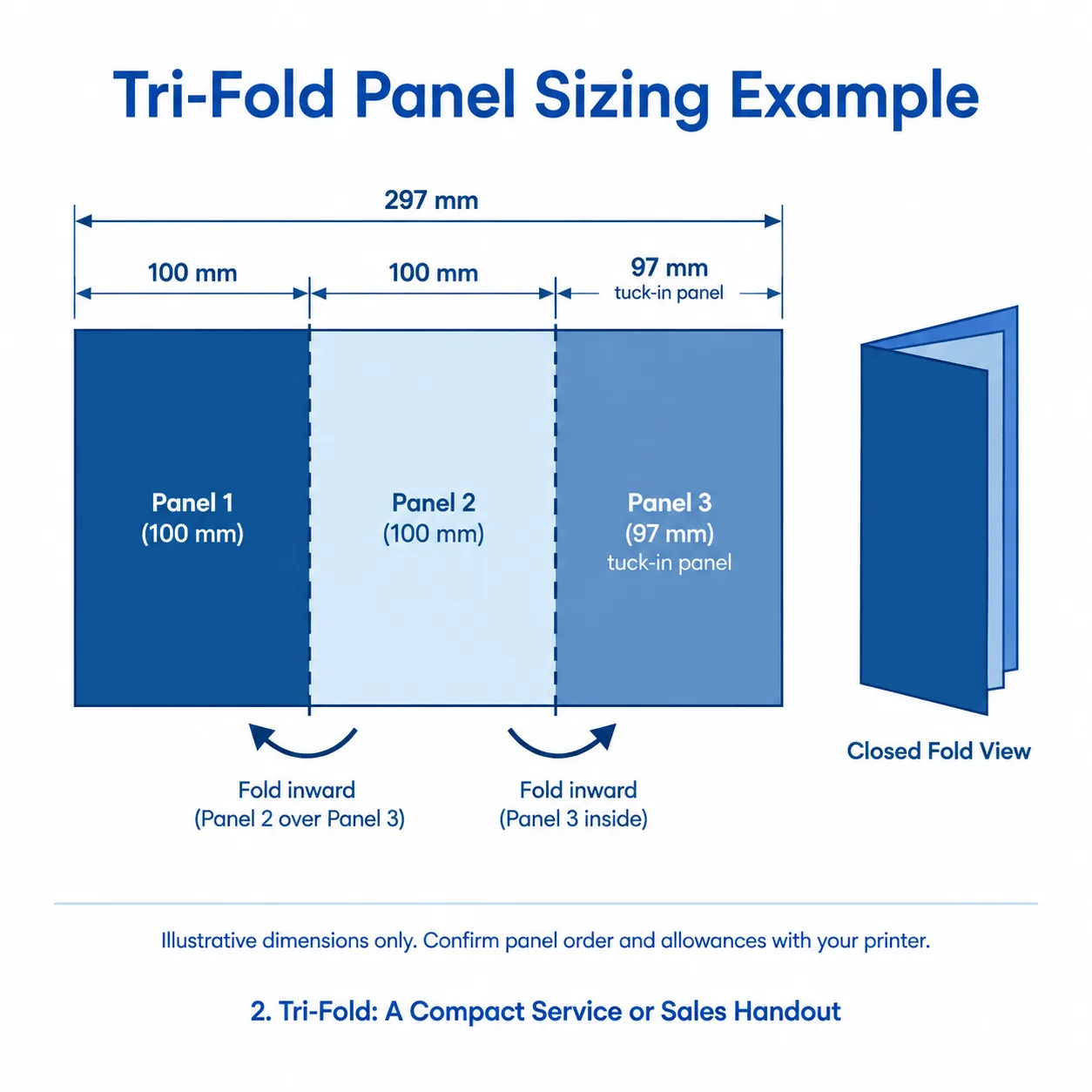
A tri-fold, also called a letter fold or C-fold, creates three panels by folding one outer panel inward and closing the other over it. It offers six printable faces in a compact format.
This works well for service menus, venue information and sales handouts. Give the cover a clear promise, use the first reveal to establish relevance, and organize the fully opened interior around benefits or services.
Tri-fold panel sizing requires compensation: the panel that tucks inside usually needs to be narrower. Equal thirds can cause buckling or prevent neat closure, especially with thicker stock. Confirm the printer’s template before designing.
3. Z-Fold: Three Connected Stages
A Z-fold uses two folds in opposite directions to create three panels. The sheet opens in a zigzag, and the panels are generally equal in width because none rolls inside another.
Use it for a three-step process, a before-and-after explanation or related product categories. Readers can view individual panels or extend the sheet to see one continuous side.
Check both reading directions. The reverse side does not automatically follow the sequence shown on the front, and the cover position depends on the intended opening. A labeled paper dummy resolves this before layout work begins.
4. Accordion Fold: A Longer Visual Sequence
An accordion fold brochure uses alternating folds across several panels. A four-panel version provides eight printable faces, while longer versions add space for further stages or categories.
This format suits timelines, product families and illustrated instructions. A continuous graphic can connect the sequence, while individual panels carry short, self-contained messages.
Longer sheets need practical handling checks. Confirm that the open brochure fits its intended setting and the closed brochure fits its holder or envelope. Keep essential text away from fold lines, even when a photograph or background runs across them.
5. Gate Fold: A Wide Central Reveal
A gate fold has two outer flaps that open toward the sides to reveal a wide central panel. Each flap is approximately half the center panel’s width, subject to production allowances.
Use it when the reveal matters: a new product, a property presentation or a campaign photograph. The closed flaps can introduce the message, with the main image and supporting copy inside.
Gate fold artwork needs careful alignment near the meeting edges. Small folding variations are more visible when a word, face or fine line is split between the flaps. Keep critical elements together and confirm the flap clearance.
6. Double Gate Fold: A Layered Presentation
A double gate fold adds a center fold after the outer gates close. The result has four panel areas across the flat sheet and eight printable faces, with a staged opening sequence.
It suits presentations that move from a cover message to an intermediate reveal and then a complete interior. Plan those stages deliberately so readers understand where to open next.
The extra fold increases the importance of paper thickness and panel allowances. Request a folded sample on the proposed stock, particularly when adding lamination, and check that the closed brochure lies acceptably flat.
7. Double Parallel Fold: More Information in a Compact Piece
A double parallel fold folds the sheet in half and then in half again in the same direction. It creates four panel areas and eight printable faces.
Consider it for information-rich handouts, compact programs or product summaries. Its closed format can suit distribution where a wide open sheet would be inconvenient.
Nested layers may require adjusted panel widths. Ask the printer to identify the outer cover, inside panels and fold sequence. Because some content remains hidden until the second opening, place essential information where readers will encounter it early.
Set Up Panels, Bleed and Reading Order
Build the artwork from an approved folding template rather than dividing the sheet into equal rectangles by default. The template should identify dimensions, fold positions, orientation and any panel compensation.
- Confirm flat and finished sizes. Specify which dimension is width and which is height, and confirm the opening direction.
- Make a paper dummy. Label every face, fold it, and mark the front cover, back cover and reading sequence.
- Apply the panel dimensions. As an illustration, a 297 mm-wide tri-fold might use two 100 mm panels and one 97 mm tuck-in panel. These are example widths, not a production template; their positions depend on which side is viewed.
- Add bleed and safe areas. Extend backgrounds beyond trim edges by the printer’s requested amount. Keep text, QR codes and logos clear of trim and folds.
- Export the agreed PDF layout. Supply the two sheet sides as requested, without manually imposing them for the press unless instructed.
The checks in our print-ready PDF export and preflight guide also help with fonts, images and export review. Brochure files additionally need fold-specific dimensions and orientation checks.
Choose Paper and Plan Brochure Scoring
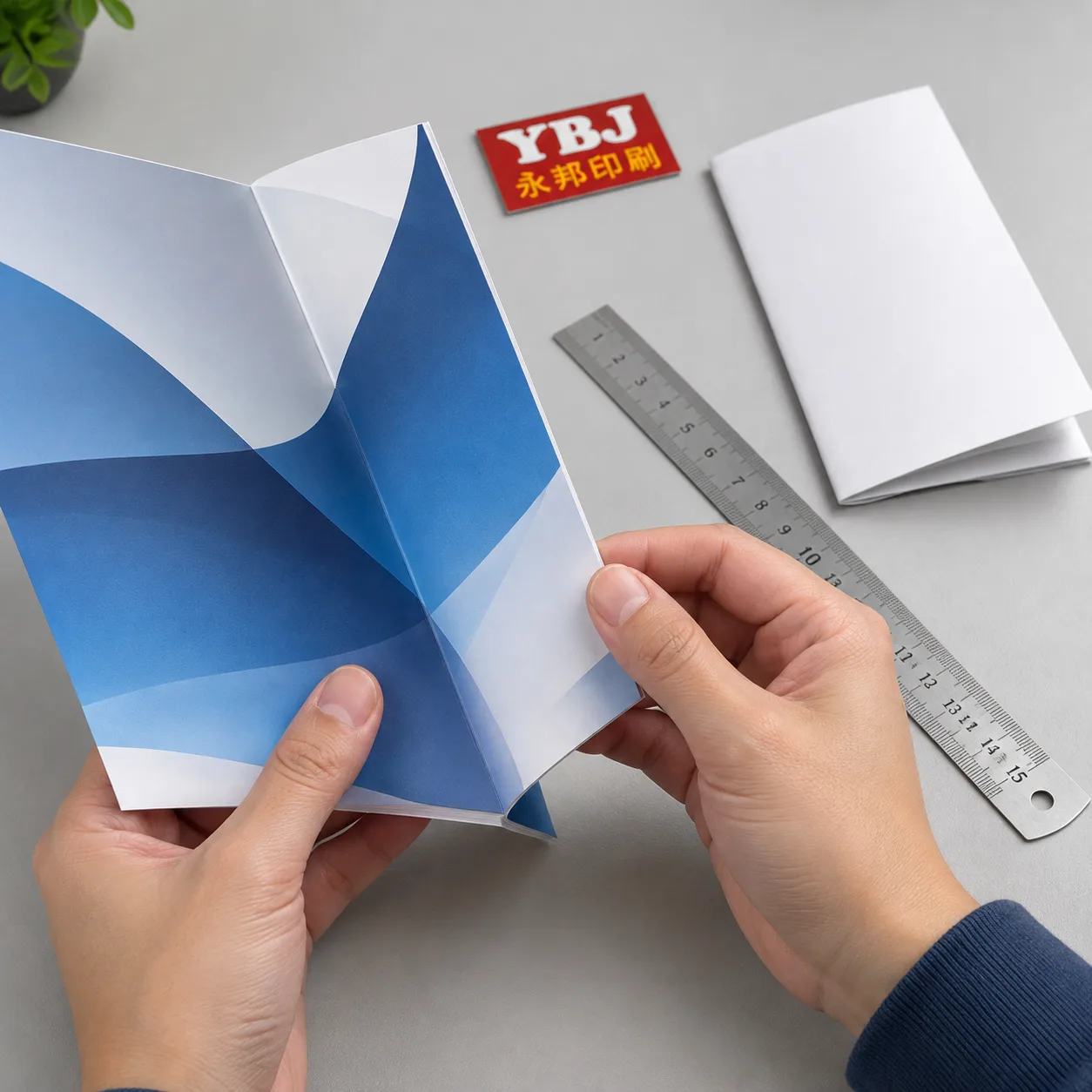
Choose paper for both its printed appearance and its ability to fold. Weight in gsm alone does not describe thickness, stiffness or how neatly several layers will close.
Coated paper can support detailed photographs, while uncoated paper offers a different surface and tactile character. Check opacity when dark images sit behind light text areas. Our guide to paper and proofs for image-rich printing explains related visual considerations, although a brochure also needs a folding trial.
Brochure scoring creates a controlled fold line before folding. Depending on the stock and process, the printer may specify a crease formed with matching tooling. This can help reduce cracking on heavier stock, especially where dense ink coverage crosses a fold. It does not guarantee a crack-free result.
Grain direction generally folds more cleanly when parallel to the fold line. Ask the printer to assess grain, coating, thickness and any lamination together. Foil or embossing near a fold also needs review.
Price and lead time depend on quantity, flat size, stock, print coverage, finishing, folding complexity, proof requirements and destination. Compare quotations using the same specification and include freight and any destination charges in your budget.
Match the Format to the Printed Product
A useful product specification connects the marketing purpose with a fold and a sample check. These are planning examples, not fixed product specifications.
| Printed product | Fold to consider | Content plan | Check before approval |
|---|---|---|---|
| Company introduction | Half fold | Cover, overview spread, contact back | Readable copy and envelope fit |
| Service handout | Tri-fold | Offer, benefits, service groups, contact | Tuck-in clearance and opening order |
| Process guide | Z-fold or accordion | One clearly labeled stage per panel | Sequence on both sides |
| Product launch brochure | Gate or double gate | Introduction followed by central reveal | Meeting edges and closed flatness |
| Compact event information | Double parallel | Essential details followed by expanded information | Panel orientation and handling |
If the content needs many pages, separate sections or repeated reference, a bound booklet may be more practical. Our saddle stitch booklet file setup guide explains the different page-count and file requirements.
Check a Folded Sample Before Production
Approve the opening behavior as well as the printed appearance. A flat PDF cannot show whether panels collide or whether the brochure feels awkward to use.
- Dimensions: Measure flat and finished sizes, including any holder or envelope fit.
- Sequence: Follow the brochure from cover to final contact panel without referring to the artwork file.
- Closure: Check tucked panels, gate edges, spring-back and excessive bulging.
- Fold quality: Inspect cracking, wrinkles and alignment where images cross folds.
- Legibility: Check small text, contrast and QR codes at actual size.
- Sample scope: Confirm whether the sample uses production stock, printing and finishing, or represents structure only.
- Order details: Confirm quantity, packing, proof approval stages and delivery destination.
A blank dummy demonstrates structure. A printed proof demonstrates selected artwork or color characteristics. Ask which sample checks the combined printing and folding result.
Key Takeaways for Your Brochure Order
The best fold makes your message easy to follow and works with the proposed paper. Choose the reading sequence first, confirm panel dimensions next, and approve a physical sample before production.
- Use simple folds for short messages and additional panels for clearly organized content.
- Allow for tucked panels, nested layers and gate clearances.
- Check paper, grain, scoring and finishes together.
For folded brochure printing, a clear specification helps YBJ Printing assess practical production options and prepare a quotation based on your actual project.
FAQ
What is the difference between a tri-fold and a Z-fold brochure?
A tri-fold tucks one panel inside another, so the inside panel usually needs to be narrower. A Z-fold alternates fold directions and generally uses equal-width panels. Both provide six printable faces, but their opening sequences differ.
Should tri-fold panels all be the same width?
Usually not for a letter-fold brochure. The tuck-in panel needs clearance so it closes neatly. The allowance depends on stock thickness, finishing and folding equipment; use the printer’s approved template rather than a universal measurement.
Is brochure scoring necessary for every paper?
No. Scoring or creasing depends on the stock, grain direction, ink coverage and finishing. Heavier or coated stocks often need additional fold preparation. Ask the printer to assess the proposed material and inspect a folded sample.
How should I prepare gate fold artwork?
Use a template showing the central panel, outer flaps and required clearances. Keep critical text and images away from the meeting edges. Confirm which faces are visible when closed, then test the sequence with a labeled dummy.
Which brochure fold costs the least?
A simple half fold may involve less folding work, but total cost also depends on sheet size, paper, quantity, printing, scoring and finishes. Compare quotations with matching specifications; the fold name alone cannot establish the lowest price.
Ready to Plan Your Custom Printing Project?
Tell YBJ Printing about your brochure or other product type, flat and finished trim sizes, page or panel count, quantity, paper or binding preferences, finish requirements, artwork file status and destination country. Include your preferred fold and any target launch date. Our team can discuss practical options and prepare a factory-direct quotation.